









Students must upload important documents prescribed by the NTA, such as the Date of Birth certificate, caste certificate, scanned photograph, scanned signature, and, for ex-servicemen, a certificate of service and PPO, while filling the online Sainik School Admission Online Application Form.
These documents are checked during e-counselling and again at the time of reporting to the allotted school for final Sainik School admission. If mistakes or mismatches are found, the student may lose the allotted seat, and the admission can be cancelled. This blog explains the required documents and correct upload formats as prescribed by the NTA in the information bulletin 2026.
Ready to Find the Best Boarding School for Your Child?
Discover Boarding Schools in India 2026-27
Also Read: Sainik School Entrance Exam Syllabus
Documents Required for Sainik School Admission 2026
After registering on the official portal, students are required to fill out the online application form of Sainik School by using their application number and password. It is during this phase that students must submit some prescribed documents in the required format.
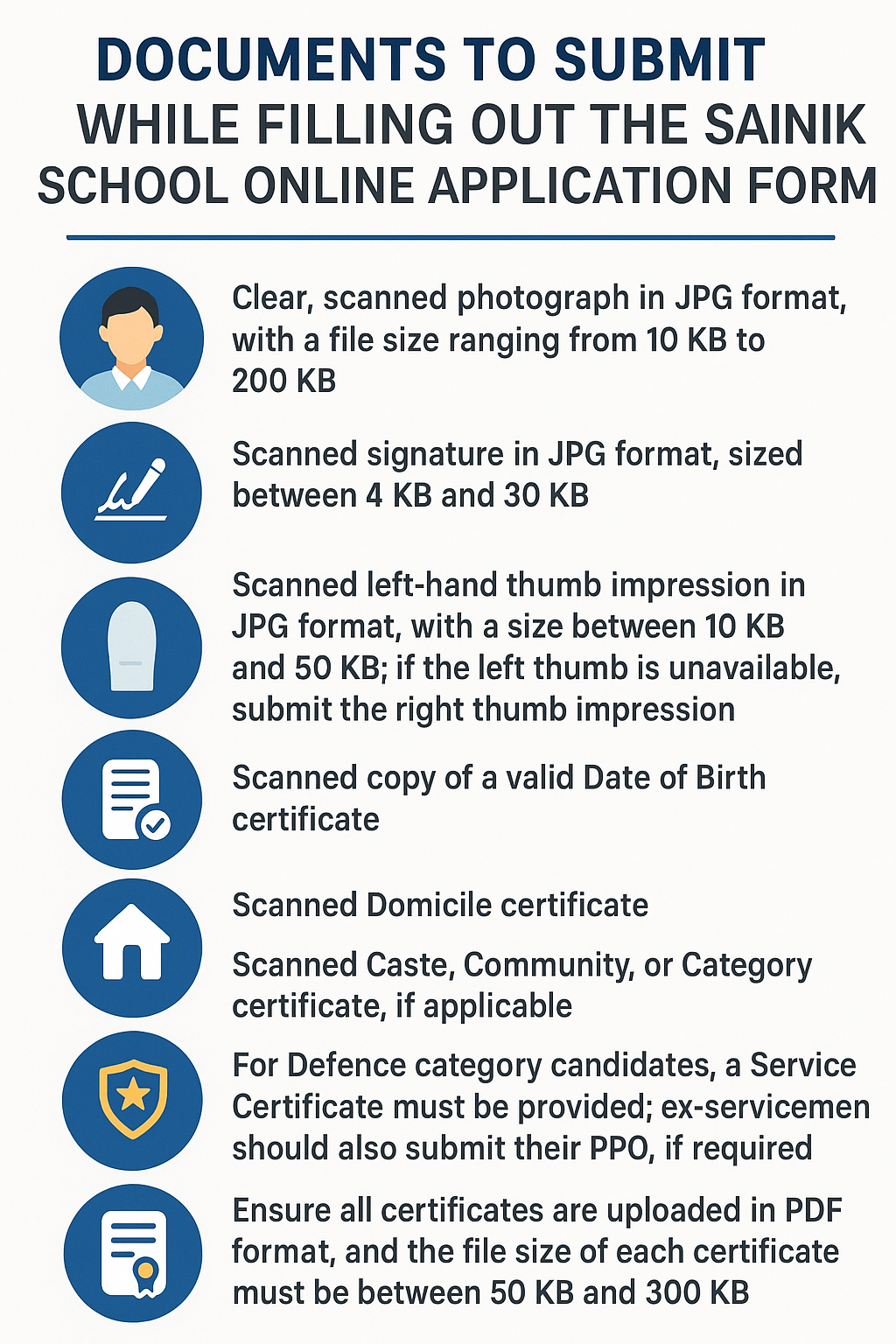
These documents will be verified at the final stage of admission to ensure that admissions are only provided to genuine, eligible candidates. Below, we have presented the list of documents that students must submit while filling out the Sainik School application form online for Class 6 and 9:
-
A clear, scanned photograph in JPG format, with a file size ranging from 10 KB to 200 KB.
-
A scanned signature in JPG format, sized between 4 KB and 30 KB.
-
A scanned left-hand thumb impression in JPG format, with a size between 10 KB and 50 KB; if the left thumb is unavailable, submit the right thumb impression.
-
Scanned copy of a valid Date of Birth certificate.
-
Scanned Domicile certificate.
-
Scanned Caste, Community, or Category certificate, if applicable.
-
For Defence category candidates, a Service Certificate must be provided; ex-servicemen should also submit their PPO, if required.
-
If currently enrolled at a recognised New Sainik School, candidates should upload a certificate from the Principal confirming their status.
-
Ensure all certificates are uploaded in PDF format, and the file size of each certificate must be between 50 KB and 300 KB.
Also Read: Sainik School Dates
Instructions to Upload Scanned Photograph
Students must follow the guidelines below to upload their scanned photo during the online application form for Sainik School:
-
Use a recent photo taken after July 1, 2025. The photo should be in JPG format and between 10 KB and 200 KB in size.
-
The photo should show 80% of your face, with your ears clear and against a white background. Don't wear a cap or goggles. Glasses are okay only if you use them every day.
-
Write your name and the date the photo was taken on the photo, if possible.
-
Don’t use computer-made or Polaroid photos. Only real, recent photos are allowed.
-
Upload only clear photos. Blurry or unclear images will make your application get rejected.
-
If you don’t upload a photo or upload someone else’s photo by mistake, your application will be cancelled.
-
Uploading fake or altered photos can also get you in trouble and is treated as cheating.
-
You do not need to sign or stamp your photo.
-
Keep 6–8 extra copies of good, colour passport-size photos with a white background for later use.
-
If criminal actions or unrelated photos are found, you could face strict punishment as per the law.
Also Read: Sainik School Eligibility Criteria
Instructions to Upload Scanned Signature
Here are the instructions to upload a scanned signature during the AISSEE 2026 online application process:
-
Sign your name in your regular handwriting (not in capital letters) on white paper using a black ink pen. Then, scan the signature to upload it.
-
Make sure the scanned file is in JPG format and between 4 KB and 30 KB in size.
-
If you don’t upload your own signature, the school will reject your form.
-
If you upload someone else’s signature, your application will be cancelled, and you may get in trouble, as it’s considered cheating. The school may also take legal action.
-
Always use your own signature so that your application is safe from rejection and any legal actions.
Also Read: Sainik School Entrance Exam
Instructions to Upload Scanned Left Hand Thumb Impression
Follow the guidelines below to upload the scanned left-hand thumb impression during the Sainik School application form filling:
-
Press your left-hand thumb on white paper using blue ink, and scan the image to upload it.
-
Make sure the scanned thumb impression is in JPG format and the file size is between 10 KB and 50 KB.
-
Check that your thumb impression is clear in the scan; unclear images will cause your application to be rejected.
-
Always check your upload to ensure it is sharp and easy to see.
Also Read: Sainik School Fees Structure
Ready to Find the Best Boarding School for Your Child?
Discover Boarding Schools in India 2026-27
Miscellaneous Instructions for Uploading Other Certificates for Sainik School Admission
The candidate must scan and upload these documents:
- Domicile certificate, caste certificate, or service certificate (whichever applies).
- Date of birth certificate.
- File size must be between 50 KB and 300 KB, and in PDF format.
Please note:
-
If the candidate’s domicile certificate is not available, he/she can upload the parent’s domicile certificate instead.
-
Candidates must show the original domicile proof during admission.
-
The residence/domicile certificate must be issued by the State Government/Union Territory authority. It must confirm that the person is a resident/domicile of that State/UT.
-
The candidate must upload a category certificate if it applies to them.
-
Students studying in an approved New Sainik School must also upload a certificate from their school. The certificate should follow the format given in Appendix XII of the Information Bulletin 2026–27.
All these documents required for Sainik School Admission must be uploaded in the correct format and file size to avoid any rejection or unnecessary delays in processing the application form of a candidate. If students follow all the instructions above, they will be in a good position to successfully get admission to a Sainik School.
Also Read: Sainik School Seats
FAQs
1. What documents are required while filling out the Sainik School online application form?
Students must upload a photograph, signature, thumb impression (JPG), birth certificate, domicile, caste/service certificates (if applicable), and school certificate (if required), all in the prescribed size and format.
2. What are the photo requirements for the Sainik School application form?
Applicants must upload a recent colour passport photo in JPG format (10–200 KB), with 80% face visible, a white background, no caps/goggles, and name/date if possible.
3. How should students upload their signature in the application form of Sainik School?
Students must sign on white paper with black ink, scan it in JPG format (10–50 KB), and upload it. Using another person’s signature leads to cancellation.
4. What is the process for uploading a thumb impression for application form for Sainik School?
Applicants must press their left thumb with blue ink on white paper, scan it in JPG (10–50 KB), and ensure the impression is clear before uploading.
5. What are the instructions for uploading certificates in the online Sainik School form?
Certificates like domicile, caste, service, or school confirmation must be uploaded in PDF format, 50–300 KB, issued by authorities, and originals must be shown during admission verification.




 as a preferred source on