





Your 10-year-old borrows a tablet to finish a school project. Twenty minutes later, you find them watching gaming videos. You remind them about homework, and another argument begins.
Children need technology for learning but also guidance to use it well. Digital readiness is not about knowing every app. It is about making safe, balanced, and thoughtful choices. For parents, digital skills are now part of wider conversations about education.
What Does Digital Readiness Really Mean?
A child may search the internet yet struggle to spot unreliable information. Another may be excellent at online games yet find it difficult to stop playing.
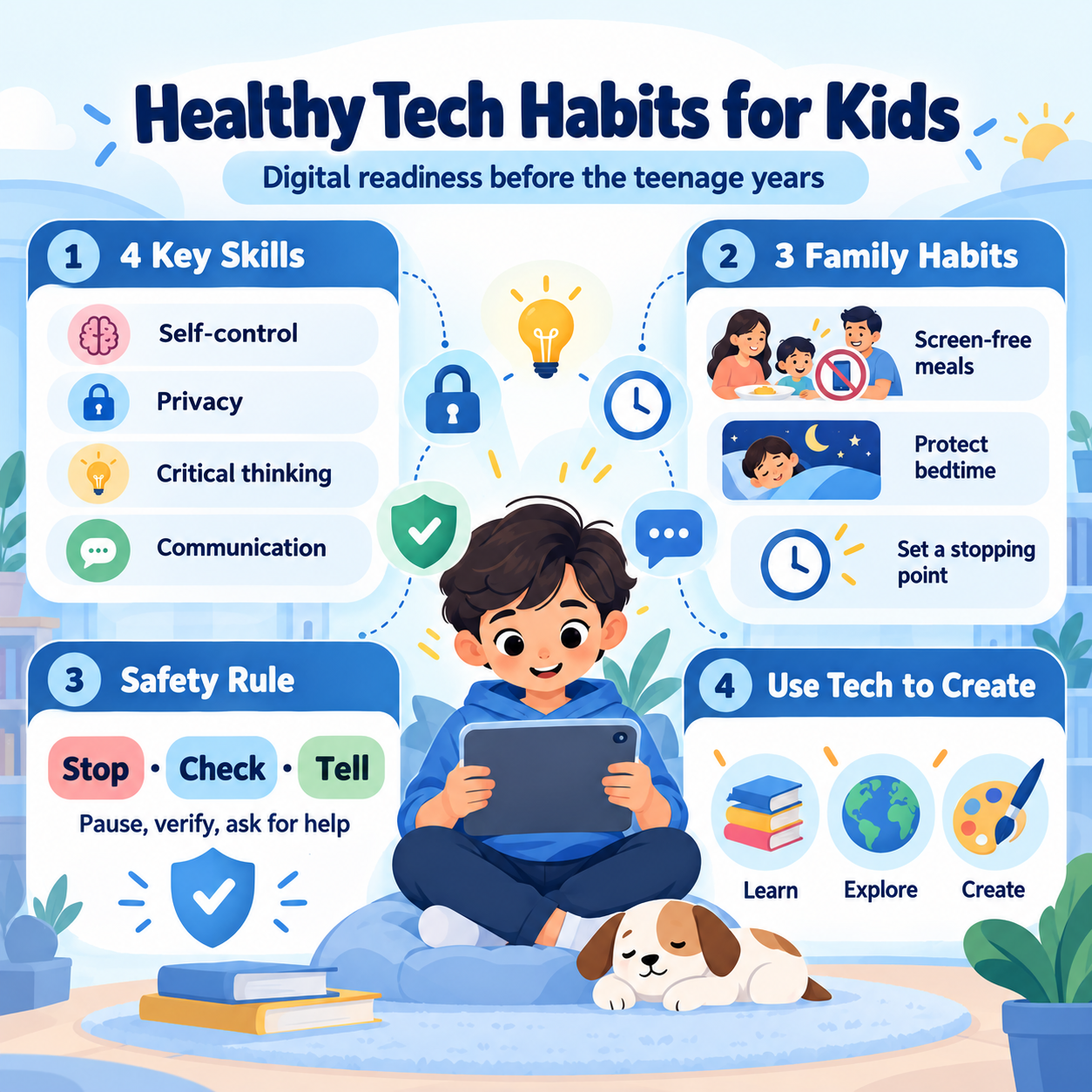
Being digitally ready means developing habits that help children manage both situations. Look for four growing skills:
- Self-control: They can finish an online activity and put the device away.
- Privacy awareness: They know why passwords, addresses, and personal photographs need protection.
- Critical thinking: They question surprising claims before believing or sharing them.
- Communication: They tell a trusted adult when something online makes them uncomfortable.
These skills take practice. Instead of only saying, “Never talk to strangers online,” try asking, “What would you do if someone you don’t know sent you a game invitation?” Listen before explaining what a safer response would look like.
UNICEF’s guidance on online privacy encourages parents to discuss personal information, privacy settings, and digital footprints with children.
Build Screen-Time Rules That Actually Work
Parents often want one perfect number for daily screen time. But what a child does on a device matters, too. Researching an animal for science homework is different from watching videos without a clear stopping point.
The American Academy of Pediatrics recommends a family media plan that protects sleep, physical activity, and time together. Rather than focusing only on minutes, begin with the purpose of each activity.
Agree on Three Family Habits
- Keep meals screen-free. Give everyone a chance to talk without notifications.
- Protect bedtime. Avoid recreational screens during the hour before sleep.
- Set a stopping point. Decide when entertainment time ends before it begins.
Ask your child to help create the plan. A rule they understand may be easier to follow than one announced without discussion.
Adults have a role here, too. If parents scroll during dinner, children may wonder why the rule applies only to them. Consistency matters more than perfection.
Review the plan as children grow. An eight-year-old and a twelve-year-old may need different levels of independence and supervision.
Teach Online Safety Through Everyday Conversations
Children do not need frightening stories to understand online risks. They need clear examples and permission to ask questions.
Start with information they should not send to unfamiliar people: a home address, school details, passwords, live location, or private pictures. Explain that even a friendly-looking message may come from someone they do not know.
Talk about online kindness as well. A joke in a group chat can hurt someone, and messages or pictures may be forwarded beyond their intended audience.
Try the Stop, Check, Tell Rule
Teach your child a simple routine:
- Stop before replying to an unexpected request.
- Check who sent it and what they are asking for.
- Tell a trusted adult if anything seems suspicious or upsetting.
Practise together. Imagine an unknown player asks your child to share a photograph to join a gaming team. Ask what they would do and why.
Review privacy settings and contact permissions together, but avoid making safety conversations feel like an interrogation. Children are more likely to seek help when they expect support rather than immediate punishment.
Make Technology a Tool for Creativity
Screen use can become more valuable when children create something instead of only consuming content.
For example, challenge your child to investigate ways to save water at home. They could compare two websites, identify three useful ideas, and turn their findings into a short presentation.
You could also encourage a digital story, a beginner coding activity, or a simple spreadsheet for planning pocket money.
Ask questions such as, “Where did you find that information?” and “How do you know it is reliable?” These conversations develop judgment alongside technical skills.
UNESCO’s 2023 Global Education Monitoring Report reminds educators and families that technology should be judged by its educational purpose, not simply by how new or impressive a tool appears.
Digital Learning at Queen Elizabeth’s School, Bilaspur Kalan, Gurgaon
For parents searching for the Best School in Gurugram or comparing a Top school in Gurugram, it is useful to ask how digital literacy fits into everyday learning. Queen Elizabeth’s School, Bilaspur Kalan, Gurgaon, on Tauru Road, lists Digital Literacy in its published Prep curriculum for Years 3–6.

Its website also describes introductions to coding, robotics and design thinking and refers to digital wellbeing in connection with esports activities. These are published curriculum details, not evidence of particular student outcomes. Parents can use them as starting points for questions about device use, online safety and classroom practice.
Conclusion: Start with One Small Change
Raising digitally ready children does not mean removing screens from their lives. It means helping them recognise risks, manage distractions and use technology with purpose.
This week, sit down together and choose three realistic digital habits for your family. Practise them, notice what works and adjust when needed. Small, repeated conversations can help children become more thoughtful and confident online.
For more information on similar schools, check out this list of the best schools in Gurugram.
 as a preferred source on